
One email template for a whole show campaign, from launch to the thank-you email. An external designer designed it for BVE Expo 2019. I coded it as 27 named blocks the marketing team could pick from in Marketo, and made it read image first on mobile.
Role Email developer (HTML build) · Client Hyve Group · Platform Marketo · Year 2019
The situation
BVE Expo was Hyve’s show for the broadcast and media production industry, held at ExCeL London from 26 to 28 February 2019. Its marketing manager needed one email template to carry the whole 2019 campaign: the launch, speaker announcements, registration, and the “thank you for attending” email after the show.
An external designer had already designed the template. My job was to turn that design into code that worked in Marketo, in Outlook, in Gmail and on mobile.
What I built
27 blocks the marketing team could pick from and fill in, each with a clear name in Marketo’s editor: “three speakers, dark blue background”, “left text, right image, pink background”, “two CTAs with arrow”, and so on.
The design used the same layout in several colours. That Marketo template format had no colour settings, so I built each colour as its own block. A marketer picks “dark blue” or “pink” instead of editing code.
My decision: image first on mobile
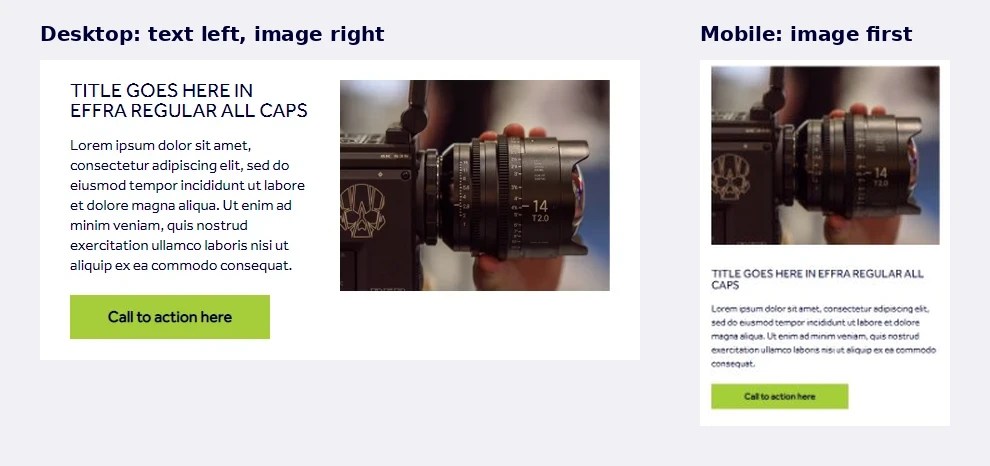
On desktop, many blocks put text on the left and the image on the right. Stacked on a phone in that order, the reader gets a wall of text and only then the picture.
I ordered the code so the image always lands on top on mobile, in all 6 of those blocks. Outlook on desktop doesn’t support the CSS that does this, so each block also has a conditional table that keeps the columns the right way round there. Desktop looks the same as the design. Mobile reads image first, then text, then button.

Built for the whole campaign
- Registration. The “register to attend” block fills in the visitor’s name, job title, company and email from their Marketo record, so the same template could send personalised registration confirmations.
- Speakers. Three layouts: three across on dark blue, three across on white, and a 2×2 grid.
- Video. Email clients don’t play video, so the video block is a linked thumbnail with a caption bar.
- After the show. A “thank you for attending” block with three calls to action.
How it works
Hand-coded HTML tables, 600px wide, with one breakpoint at 600px. The template has 189 tables and 47 Outlook conditional comments. Buttons are padded table cells, so they still show when images are off. The brand font, Effra, is hosted in Marketo, with Arial forced in Outlook, which can’t load web fonts.
What I’d do differently
22 of the 45 images have alt text, but 15 of those just say “BVE”. There’s no dark mode handling. Today I’d write real alt text into every image slot and test dark mode as part of the build.
I’d also use Marketo’s newer module format, which I used later for Autumn Fair. It lets one block carry its own colour settings, so the colour versions of the same layout wouldn’t need to be separate blocks.
If you need email templates that hold up in Outlook and on mobile, I’m open to permanent and freelance roles. alessio@golfetto.uk


